US business call workflows
AI receptionist for garage door companies
with a clear next action.
An AI receptionist for garage door companies captures repair and installation inquiries, checks the service address and routes requests according to your approved urgency and scheduling rules. Telephoned.pro scopes that intake around your existing number and team. The assistant does not diagnose a door, advise a caller to adjust springs or promise a technician until your dispatch process confirms the next action.
Review AI Receptionist for Home Services: Never Miss a Job Call. A related guide to check alongside this page is AI Receptionist for Cleaning Services.
Workflow review
Separate a stuck-door request from an installation estimate
Illustrative scenario: a homeowner calls before work because the garage door will not open. Your technician is already on a job and the office is temporarily unavailable. Useful intake captures the callback number, address and reported problem, then follows the business's approved escalation rules. It should not tell the caller to force the door, release loaded parts or attempt a repair.
An installation estimate, a routine maintenance visit and a call about an existing warranty job need different paths. Identify the reason for contact before discussing availability. Your company decides which work it accepts and which inquiries require a specialist or office review. The assistant should use those distinctions rather than treat every conversation as the same repair appointment.
Workflow review
A garage door intake flow to review with your team
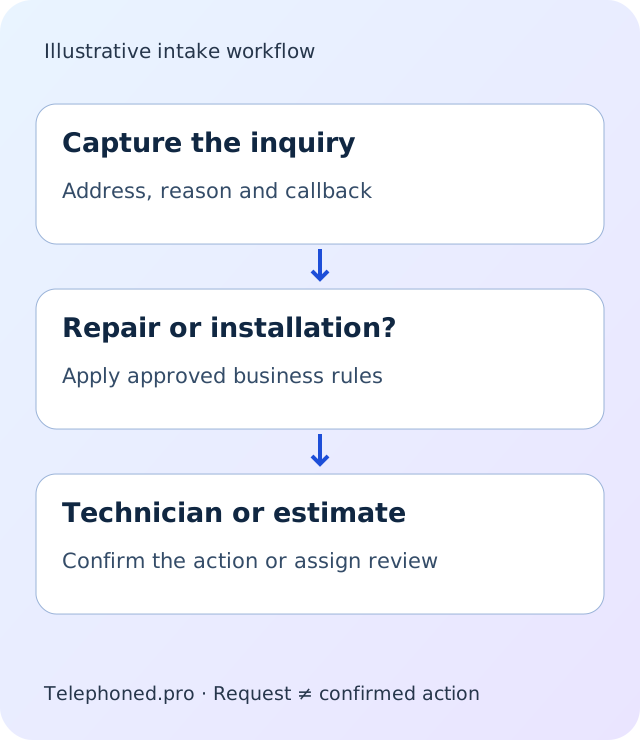
Start with the service location and the caller's preferred callback details. Capture a plain-language description: a door that will not move, an opener question, a damaged panel or a planned replacement. Use the questions approved by your technicians to route the request. Capturing a caller's description is different from establishing the cause of a fault.
Check service area, residential or commercial scope and whether the request concerns work already underway. A customer calling about a recent visit should reach the current owner with the existing context. A new installation inquiry may require a measurement or estimate appointment. A commercial door issue may need a different technician or approval path. If the rules cannot settle the request, assign it for review.
For bookable work, apply the approved visit type and calendar rules. Keep a requested time distinct from a confirmed appointment. If the scheduling connection cannot complete the action, explain that the request needs confirmation and give the office a clear task. The record should contain the reported issue, location and promised next action, without implying that a particular part or repair is already authorized.
Your call flow
Review a normal request and an exception
Bring your current tools and operating rules. We will distinguish confirmed actions from requests that need your team.
Workflow review
Keep mechanical safety and urgent decisions with people
Garage doors and their components can present hazards. Your workflow should use business-approved safety wording and escalate concerns according to your operating procedure. The assistant should not diagnose spring tension, recommend repairs or ask callers to handle equipment. A caller reporting injury or immediate danger needs the approved emergency response, not a sales script.
An urgent routing instruction also needs a fallback. If the on-call technician does not accept a transfer, decide whether another approved person is tried or an owned callback request is created. Never describe a ringing phone as an accepted dispatch. Arrival windows, parts availability and the suitability of a repair may require staff review. Make those dependencies clear to the caller and in the saved record.
Review this workflow with your team.
Bring one routine request and one exception. Review existing-number forwarding where supported, plus AI transparency.
Workflow review
What to check before choosing a garage door receptionist
Bring your service area, operating hours, job categories and on-call instructions. Identify the difference between an inspection, repair appointment and replacement estimate. If some commercial equipment or brands are outside your scope, include those exclusions. The call flow should help the office make a correct decision rather than create appointments that staff later has to unwind.
Test an opener inquiry, a stuck-door call, a replacement estimate and an existing customer asking about a prior visit. Add an out-of-area address, an unavailable calendar and an unanswered technician transfer. Listen for unsupported diagnosis or arrival claims, then inspect the records. The correct information must reach the correct owner with an accurate account of what actually happened.
Bring the exact dispatch, CRM or scheduling platform as a dependency to validate. Confirm supported account actions and permissions before assuming the system can create a job or modify an appointment. Ask how retries avoid duplicate records and how staff correct a misunderstood address. Use fictional customers during the demonstration rather than real access details or private records.
Workflow review
Choose a narrow starting point and review the outcomes
Overflow or after-hours intake can be evaluated while your staff continues managing technical decisions and dispatch. Define one ordinary request and one exception, then agree what evidence shows a successful handoff. Captured calls, accepted dispatches and completed repairs are different outcomes. Do not treat the first as proof of the last.
Follow-up should reflect the current job state. A caller who has already spoken with a technician or cancelled a visit should not continue receiving an unchanged booking sequence. An existing active request should retain its owner when the customer calls again. These details matter when connecting answering with the wider office workflow.
Bring those scenarios to a demo and inspect both the conversation and its destination record. The proposed setup should specify who maintains the instructions, who reviews failures and what changes require another test. Your business keeps authority over technical advice, service scope and crew commitments while routine intake follows a clear approved path.
Before you decide
Questions about the proposed setup
No. It captures the reported issue and applies approved routing instructions. Technical diagnosis and repair advice remain with qualified staff.
A visit may follow verified calendar and service rules. A requested time is not confirmed until the scheduling action succeeds.
Use an approved fallback with a responsible owner. The caller should not be told a technician is dispatched without confirmation.
Want to hear it on your own calls?
Secure your spotReview the workflow
around your business.
Bring a typical call and one exception. We will explore the right scope, dependencies and staff handoffs before you decide.