Appointment No-Show Follow-Up: A Safe Recovery Workflow
Build a no-show follow-up workflow that verifies appointment status, avoids duplicate bookings and gives customers a clear path to reschedule.
By Telephoned.pro
AI-assisted editorial guide from Telephoned.pro. The workflow and timing examples are illustrative, not customer results, legal advice, healthcare guidance or a promise of specific integrations.
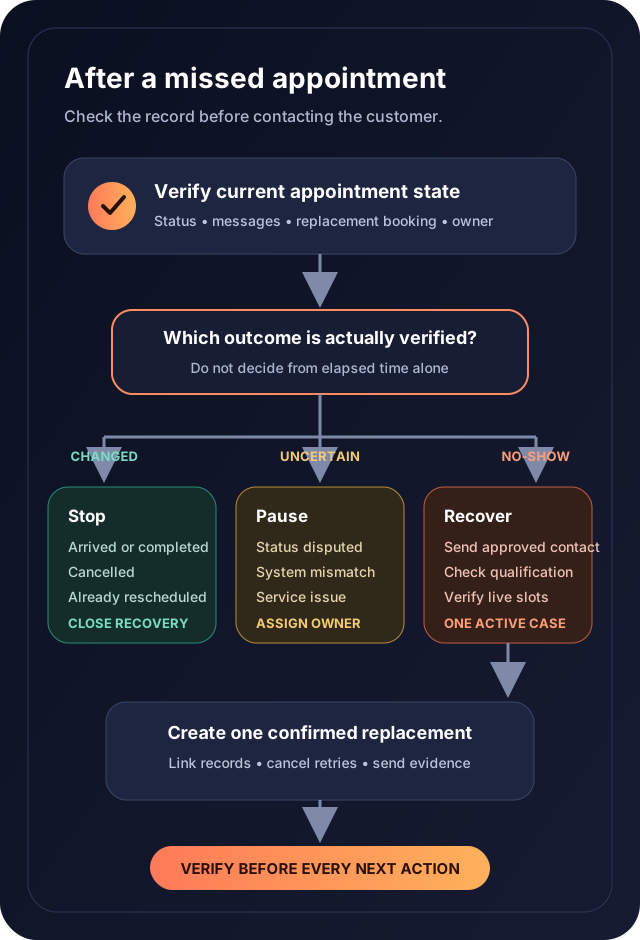
Appointment no-show follow-up should help a customer recover the next step without creating a second scheduling problem. The workflow needs to confirm that the appointment was genuinely missed, check whether the customer already contacted the business, protect the original booking record and offer only availability that the scheduling system can verify. A generic reminder sent from a stale status can frustrate a customer who arrived late, cancelled, rescheduled or was affected by a business-side mistake.
See a no-show recovery workflow in a demo
Bring one test appointment and your current cancellation and rescheduling rules. Ask Telephoned.pro to demonstrate status verification, customer contact, safe slot selection and staff escalation—including what happens when the calendar is unavailable.
Define a no-show with evidence
Choose the event that confirms a missed appointment. Depending on the business, that may be a staff status update after a grace period, a check-in system result or a documented review by the appointment owner. Time passing is not always enough. The customer may be waiting, the provider may be delayed, or a cancellation may exist in another channel.
- A stable appointment identifier linked to the correct customer and service.
- The scheduled start time, duration, location and explicit time zone.
- The latest appointment status and the system that owns that status.
- The provider, branch or team responsible for the appointment.
- The approved grace period and the event that confirms a no-show.
- Recent inbound calls, messages, cancellation requests and rescheduling attempts.
- The customer’s communication preferences, suppression state and approved contact channels.
- An internal owner for uncertain, sensitive or repeatedly missed appointments.
Separate appointment states before automating contact
- Scheduled: the appointment remains in the future or inside the approved arrival window.
- Arrived or in progress: no recovery message should be sent.
- Completed: the workflow closes and any queued no-show contact is cancelled.
- Cancelled: follow the documented cancellation outcome rather than labeling the customer a no-show.
- Rescheduled: preserve the original record and link it to the confirmed replacement appointment.
- No-show confirmed: the recovery workflow may begin under the approved policy.
- Status uncertain: hold automation and assign a person to reconcile the record.
- Business-side cancellation or service failure: use the business’s recovery process, not customer no-show language.
Verify status immediately before the first message
A no-show event can be corrected after it is created. Before contacting the customer, re-read the authoritative appointment record and recent communication history. If the customer already rescheduled by phone, a new automated invitation could produce a duplicate slot. If the system cannot verify the current state, hold the message and create a review task instead of guessing.
- The appointment is still marked as a confirmed no-show.
- The customer did not arrive, complete or cancel the appointment.
- No replacement appointment is already confirmed.
- No open staff conversation is handling the same request.
- The service, provider and location are still valid for rescheduling.
- The recipient and contact channel remain approved.
- The recovery attempt limit and quiet period have not been exceeded.
- No operational incident requires different wording or human outreach.
Choose the next action from the customer’s response
The first message should make the situation easy to correct. Identify the missed appointment clearly, explain the available next step and provide a way to report an error. Do not assume why the customer missed it or use blame-based language. A customer response should update one existing recovery case, not create a fresh lead and a second sequence.
- Wants to reschedule: collect the minimum required preferences and check live availability.
- Says the appointment was completed: pause automation and send the record for staff review.
- Says they cancelled earlier: preserve the message and reconcile the cancellation history.
- Needs a different service or location: return to qualification before offering a slot.
- Has a complaint or service issue: stop routine recovery and assign the appropriate owner.
- Declines further contact: record the applicable channel preference and stop the sequence.
- Does not respond: follow the approved attempt limit, then close or escalate with a documented reason.
Worked workflow: the customer already rescheduled by phone
This example is illustrative. An appointment is marked as a no-show after the approved review point. A recovery text is queued. Before it sends, the customer calls the office and a staff member creates a replacement appointment for the following week.
The send-time check finds the linked replacement appointment and cancels the queued recovery message. The original appointment remains marked as a no-show or corrected according to the business’s policy, while the new booking retains its own identifier. The recovery case records that rescheduling was completed by staff and closes without offering another slot.
If the call note says the customer requested a new time but no appointment exists, the workflow should not treat that request as a confirmed booking. It keeps one owned follow-up task and communicates the pending state accurately until the calendar write succeeds or a person resolves it.
Reschedule only against verified availability
A recovery workflow should apply the same scheduling rules as a new booking: service duration, provider eligibility, location, buffers, resource constraints and any required approval. Displaying a time is not confirmation. The replacement becomes confirmed only after the scheduling system accepts it and returns evidence that the appointment exists.
- Recheck the slot immediately before the final booking action.
- Use an idempotency or duplicate-prevention rule so retries cannot create two appointments.
- Keep the old and new appointment identifiers linked for audit and reporting.
- Release or preserve the original slot according to its actual status—not an assumption.
- Send confirmation only after the replacement record exists.
- If booking fails, explain that the requested time is not confirmed and create the approved fallback.
- Cancel remaining recovery attempts after verified rescheduling.
- Apply the business’s approved cancellation, deposit or eligibility policy without inventing exceptions.
Escalate exceptions with one accountable owner
Automation should pause when the record is disputed, the customer reports a serious issue, identity cannot be matched, the service is sensitive, or repeated no-shows require judgment. Each pause needs a reason, current owner, review deadline and allowed next action. Copying several employees without one owner can leave the customer in limbo.
Escalation should change the work. It may ask staff to reconcile two systems, review an accessibility need, correct a scheduling error or decide whether another booking is appropriate. The automation should not independently make medical, legal, financial or punitive decisions.
Test the complete recovery journey
- A customer arrives during the grace period and receives no no-show message.
- A completed appointment cannot enter the recovery sequence.
- A cancellation received through another channel stops no-show language.
- A replacement booking made moments before send cancels the queued message.
- A rescheduling request without a successful calendar write remains pending, not confirmed.
- Two simultaneous booking attempts produce at most one replacement appointment.
- A calendar outage creates a visible fallback and no false confirmation.
- A wrong-person or disputed-status reply pauses automation and reaches the owner.
- An opt-out or channel preference is honored by later recovery attempts.
- A provider or branch change forces requalification before another slot is offered.
- The attempt limit closes the sequence without endless reminders.
- A business-side cancellation uses the correct recovery path and wording.
Measure recovery without overstating attribution
Track confirmed no-show cases, false or corrected no-show statuses, successful deliveries, customer responses, rescheduling requests, verified replacement appointments, booking failures, staff escalations and time to resolution. Keep requested, booked, attended and completed appointments separate. A message sent is not a recovered appointment, and a new booking after contact does not by itself prove the automation caused it.
Know the limits
No-show policies can involve contracts, deposits, regulated services, accessibility needs and jurisdiction-specific communication rules. Automation cannot determine whether a customer has a valid excuse, whether a fee is enforceable or whether another appointment is clinically or operationally appropriate. Have the relevant legal, operational and professional owners approve the policy, messages, data handling and escalation boundaries.
Telephoned.pro can help map communication, scheduling and staff handoffs around the systems a business already uses. A useful demo should prove the normal path and the failure paths with test records before any live customer is contacted.
Map one no-show recovery journey
Use a test appointment to walk through arrival, cancellation, confirmed no-show, disputed status and failed rescheduling. The goal is a recovery process your team can verify—not simply another reminder sequence.
AI Receptionist Calendar Failure: How to Avoid False Bookings
Use a safe fallback workflow when an AI receptionist cannot write an appointment to the calendar, so callers do not receive confirmations for bookings that do not exist.
Invoice Reminder Automation: When to Send, Pause and Escalate
Build an invoice reminder workflow that uses verified payment status, pauses for disputes and partial payments, and gives every overdue account a clear owner.
Reading is good.
Running it is better.
Bring one real workflow. We will show you how calls, follow-up and scheduling could connect for your business.
Book a demo call →