Invoice Reminder Automation: When to Send, Pause and Escalate
Build an invoice reminder workflow that uses verified payment status, pauses for disputes and partial payments, and gives every overdue account a clear owner.
By Telephoned.pro
AI-assisted editorial guide from Telephoned.pro. The workflow and timing examples are illustrative, not legal, accounting or collections advice, customer results, or a promise of specific integrations.
Invoice reminder automation should reduce manual chasing without sending the wrong message at the wrong time. The safest workflow begins with a trusted invoice record, checks the latest payment state before every contact, pauses when a customer disputes the bill or reports a problem, and assigns a person when the next step needs judgment. The objective is not maximum message volume. It is a clear, reviewable path from invoice issued to paid, resolved or intentionally escalated.
See the invoice handoff in a workflow demo
Bring one sample invoice and your current reminder policy. Ask Telephoned.pro to demonstrate the send-time status check, partial-payment update, dispute pause and billing-owner handoff before any live rollout.
Start with one authoritative invoice record
Choose the system that decides whether an invoice is open, partially paid, paid, void, refunded or under review. Other tools may display the information, but the workflow needs one source of truth for the balance, due date, currency, customer account and invoice identifier. If two systems disagree, route the record for review instead of choosing whichever status is convenient.
- A unique invoice identifier that remains stable across reminders and payment updates.
- The original amount, remaining balance, currency, issue date and due date.
- The customer account and an approved billing contact channel.
- The current invoice status and the timestamp of the most recent verified update.
- A responsible internal owner for disputes, exceptions and failed deliveries.
- A communication history showing what was sent, when, through which channel and for which balance.
Define states before defining messages
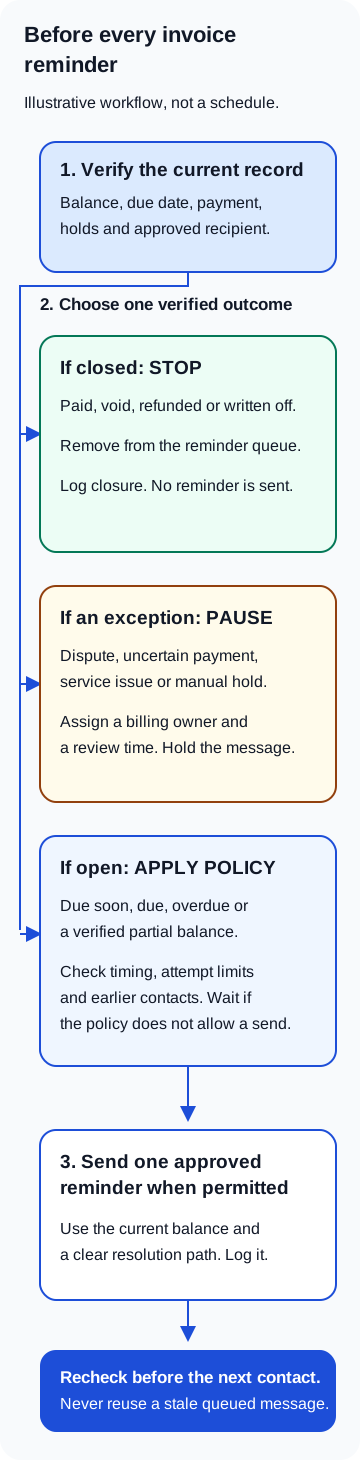
A reminder sequence should follow invoice states, not a calendar alone. An issued invoice that is not yet due needs a different action from an overdue invoice. A partially paid invoice needs the remaining balance shown accurately. A disputed invoice needs a pause and an owner. A paid or void invoice must leave the reminder sequence immediately.
- Issued: the invoice exists and delivery should be confirmed before any overdue language is used.
- Due soon: a courtesy reminder may be sent if the business has approved one.
- Due today: the workflow can restate the due date, payment route and support contact.
- Overdue: the message can identify the invoice, verified outstanding balance and next resolution step.
- Partially paid: reminders use only the remaining verified balance and acknowledge the recorded payment.
- Disputed or service issue: automated collection reminders pause while the assigned owner investigates.
- Promise to pay: the next automated contact waits until the agreed review date, if policy allows.
- Paid, void, refunded or written off: reminders stop and the closure is logged.
Use timing bands, not an endless sequence
Set timing around the invoice due date and the business's actual review capacity. An illustrative schedule could include a delivery check after issue, one courtesy reminder before the due date, a due-date notice, an overdue reminder, and a later owner review. The exact intervals should reflect contract terms, customer type, local requirements and internal policy. Automation should never invent a late fee, deadline, consequence or legal status that is absent from the approved record.
Add a maximum number of automated attempts and a quiet period between contacts. Count attempts across email, SMS and calls so three channels do not each send a separate sequence. If a message bounces, a phone number is invalid or the customer asks to use a different channel, update the contact path rather than repeatedly retrying the failed one.
Check payment status immediately before every send
Queueing a reminder does not make its data current. Re-read the authoritative invoice record when the message is about to send. If the balance changed, rebuild the message from the new state. If the status cannot be checked, hold the reminder for review; do not send an overdue notice based on stale data.
- The invoice still exists and belongs to the intended customer account.
- The invoice remains open and the due date has not been changed.
- The outstanding balance matches the latest authoritative record.
- No payment, credit, refund, void or write-off has closed or reduced the balance.
- No active dispute, complaint, service issue or manual hold is present.
- The recipient and channel remain approved for billing communication.
- The contact-frequency limit and quiet period have not been exceeded.
- No other workflow has already sent the same reminder for this state.
Worked workflow: partial payment after a reminder is queued
Illustrative US scenario: a Pennsylvania equipment-repair business's invoice has a remaining balance of $1,200 when an overdue email is prepared. Before delivery, a $500 payment is recorded. The send-time check detects the new payment and cancels the old message. The workflow recalculates the verified balance as $700, records the payment event and decides whether a revised reminder is permitted under the approved timing rule.
If the payment record is pending or the two systems disagree, the workflow does not guess. It places the invoice on a payment-verification hold and assigns the billing owner. The customer should not receive a message claiming that $1,200 remains due while the system is uncertain. When the owner confirms the state, the same invoice record resumes from the correct status instead of starting a second reminder sequence.
Test the payment-before-send exception
Bring one test invoice and a partial-payment scenario. In a demo, map how the billing record, send-time check and owner review could connect, then confirm which connections your setup supports.
Pause conditions need an owner and a deadline
A pause without ownership can hide an invoice indefinitely. Each hold should record who is responsible, why automation stopped, what evidence is needed and when the case will be reviewed. Useful pause reasons include a disputed charge, reported service problem, identity mismatch, payment-verification issue, bankruptcy or legal hold, accessibility request, or a direct instruction from an authorized employee.
Escalation should change the work, not merely send the same reminder again. It may assign a billing specialist, request account-manager review, verify contact details or require approval for the next communication. Legal or collections action is outside a generic reminder workflow and should never be triggered from an AI-generated judgment.
Make every message easy to verify and resolve
- Identify the business and the invoice clearly without exposing unnecessary account information.
- Use the verified due date and current balance from the send-time check.
- Provide the approved payment route or instructions; do not request sensitive payment details by reply.
- Offer a clear way to report a payment, dispute, service problem or incorrect recipient.
- State the next operational step accurately without unsupported threats or urgency.
- Keep the tone consistent across email, SMS, voice and human follow-up.
- Log delivery, failure, customer response and the state change that follows.
Test the full journey before using live accounts
- A normal unpaid invoice moves through the approved schedule without duplicate contacts.
- A payment recorded seconds before send cancels the reminder.
- A partial payment changes the balance and does not restart the sequence from the beginning.
- A changed due date removes the invoice from the old timing band.
- A dispute or service complaint pauses reminders and creates an owned review task.
- A bounced email or failed SMS changes the contact plan instead of causing repeated retries.
- Two invoices for one customer remain distinct and are not combined without an approved rule.
- A wrong-recipient report suppresses that contact while preserving the internal invoice record.
- An unavailable billing system holds the send until current status can be verified.
- A paid, void or refunded invoice cannot re-enter the overdue sequence on a delayed event.
Review outcomes without confusing activity with recovery
Track invoices entering each state, reminders successfully delivered, responses, disputes opened, holds awaiting review, time to owner action, payments verified after contact and incorrect reminders prevented. Message count is an activity measure, not a business outcome. Payment after a reminder is not automatically proof that the reminder caused it, and Google clicks or website visitors do not verify invoice recovery.
Know the limits
Invoice-reminder automation does not determine whether a charge is contractually valid, whether a customer has a legal defense, how a payment should be accounted for, or which collection rules apply. Requirements vary by jurisdiction, agreement, customer type and communication channel. Have qualified legal and finance professionals approve the policy, templates, data handling and escalation boundaries before launch.
Telephoned.pro can help map customer communication and operational handoffs around the systems a business already uses. A useful demo should begin with a test invoice, one partial-payment case, one dispute and one system-failure scenario—not a promise that every invoice can be handled without people.
Map one safe invoice-reminder workflow
Bring one sample invoice, your approved reminder policy and the statuses used by your billing team. We will map the checks, pause rules and human ownership needed before any message is sent.
Missed Call Follow-Up: An Ownership Guide for US Businesses
Build a missed call follow-up workflow for your US service business: assign one owner, set callback rules and track inquiries through to a booked appointment.
Estimate Follow-Up Automation: From Quote Sent to Clear Next Step
Design an estimate follow-up workflow that verifies delivery, responds to buyer signals and stops automatically when a quote is accepted, declined, revised or no longer valid.
Reading is good.
Running it is better.
Bring one real workflow. We will show you how calls, follow-up and scheduling could connect for your business.
Book a demo call →